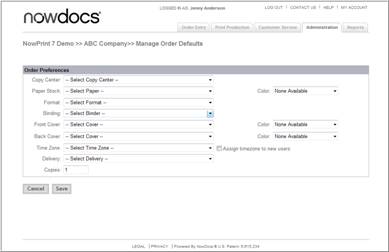
You can specify default ordering preferences for a Corporate Account to save users from having to select the most commonly used settings when placing orders. The selections you choose will automatically be selected by default when orders are placed. However, if a user chooses to make changes during the ordering process, those changes will override the default settings.
Use the following steps to set order defaults:
Click the Admin link from the NowPrint homepage.
Click the Edit link under the Order Defaults option.
Use the Copy Center drop-down menu to specify the print center to which orders should be sent by default.
Use the Paper Stock and Color drop-down menus to set the default paper type and color.
Use the Binding drop-down menu to set the binding preference.
Use the Front Cover and Back Cover and corresponding Color drop-down menus to specify the default covers.
Use the Time Zone drop-down menu to set the time zone of your default location. This is important, as the system will use this information to calculate estimated delivery time and to time stamp each step of the order process.
Use the Assign time zone to new user’s checkbox to automatically assign the time zone you specified with the Time Zone drop-down menu to users who self-register.
Use the Delivery drop-down menu to specify the default delivery method.
Use the Copies field to specify the default number of copies.
Click the Save button.