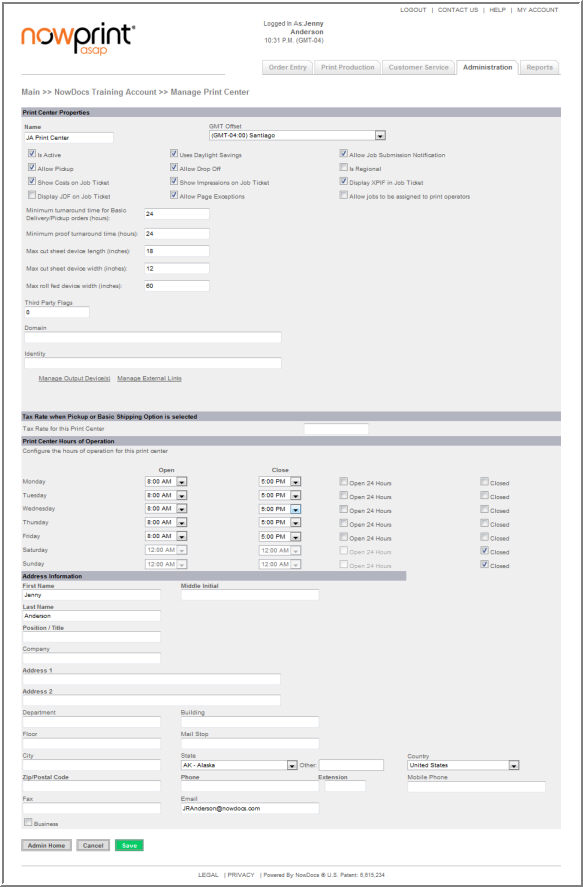
A print center is a logical entity most often represents a physical location. A print center also represents the production activities accomplished within a facility.
Use the following steps to add a print center:
Click the Admin link from the Homepage.
Click the Add link under the Print Centers icon.
Below is an overview of the Print Center fields:
Field |
Description |
Name |
Enter a name for the print center.
|
GMT Offset |
Select the print center's time zone.
|
Is Active |
If you are ready for this print center to be immediately available for producing orders, select the checkbox.
|
Uses Daylight Savings |
Select the checkbox if the print center observes daylight savings time.
|
Allow Job Submission Notification |
Select the checkbox if you would like an email to be sent to the print center whenever an order is submitted.
|
Allow Pickup |
Select the checkbox if the print center supports the ability for users to physically pick up their orders from the print center in person.
|
Allow Drop Off |
Select the checkbox if the print center supports the ability for users to submit a document in hard copy (paper) format by physically taking the document to the print center.
|
Is Regional |
This preference is used to indicate that the print center has a defined regional location that it services. Unless there is the need to preselect a production facility based on the submitter’s postal code, then this should be left unset.
|
Show Costs on Job Ticket |
Select the checkbox if you would like to display pricing on job tickets and thus make this information visible to production staff.
|
Show Impressions on Job Ticket |
Select the checkbox if you would like to display impression information on job tickets.
|
Display XPIF in Job Ticket |
Select the checkbox to allow access to XPIF instructions from the job ticket.
|
Allow Page Exceptions |
Select the checkbox if the print center supports the ability for users to designate that specific pages in a document be printed differently from the rest (for instance, printing certain pages in a document in color instead of black & white).
|
Download Order Files |
Select the checkbox to allow the ability to download order files from the job ticket.
|
Allow jobs to be assigned to print operators |
Select the checkbox to allow an order's fulfillment to be assigned to a specific operator at the print center.
|
Use NowDocs Inventory Tracking |
Select the checkbox if you would like to track inventory for this print center.
|
Allow Backordered Inventory |
When the inventory feature is enabled, this preference is used to determine whether an order can be placed that contains materials that do not have an on-hand inventory value to support the number of items required for the order.
|
Allow Meter Reads |
Select the checkbox if you would like to track the total number of impressions produced.
|
Minimum turnaround time for Basic Delivery/Pickup orders (hours) |
Enter the minimum number of hours required for the print center to produce a job that requires delivery and/or pickup in the field.
|
Minimum proof turnaround time (hours) |
Enter the minimum number of hours required for the print center to produce a proof in the field.
|
Max cut sheet device length (inches) |
Defined max length of sheet fed paper at print center. Default is 18.
|
Max cut sheet device width (inches) |
Defined max width of sheet fed paper at print center. Default is 12.
|
Max roll fed device width (inches) |
Defined max width of roll fed device at print center. Default is 60.
|
Third Party Flags |
This is left blank unless a custom integration has been completed.
|
Mass Transit transfer folder |
Use the field to specify the folder where files will be queued for transfer to the print center.
|
Mass Transit destination folder |
Use the field to specify the print center's local folder where files will be retrieved.
|
Days before archiving completed/cancelled orders |
Use the field to indicate when you would like completed/cancelled orders to be archived.
|
Import item setting from |
Use the drop-down menu if you would like to copy settings for items from an existing print center. Items are the components of a print product, such as paper, impressions, bindery, covers, tabs, etc.
|
Tax Rate for this Center |
Flat tax rate applied to all jobs produced at the print center.
|
Configure the hours of operation for this print center |
Sites set to EU languages use the 24 hour clock. We do have a minor bug on this where the opening time is at 12 Hr.
|
Address Information |
Enter the print center's physical address, phone numbers, and email address in the fields, along with the first and last name of the person who is the main contact at the print center.
|
Click the Save button.