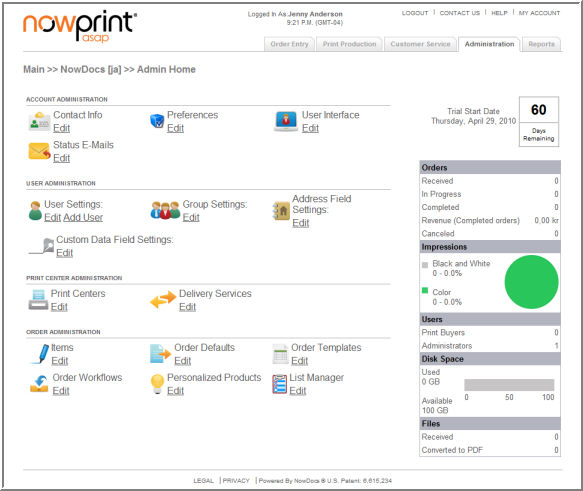
The NowPrint Admin interface is used by the Corporate Account Administrator to manage the Corporate Account settings, as well as the groups, users, print centers, products, and other components within the system.
Contact Info: Specify contact information for the account.
Preferences: Set preferences related to the Account's functionality.
User Interface: Configure settings related to the look, feel, and function of the screens within the NowPrint system.
Status E-mails: Manage email notification messages.
User Settings: Add and/or edit user account settings.
Group Settings: Add and/or edit Groups Filing cabinet management and the various mappings can be done here too.
Address Field Settings: Configure settings for the display of the address fields used to enter contact information.
Custom Data Field Settings: Allows custom fields to be added to the ordering process to capture this information.
Print Centers: Manage print information.
Delivery Services: Manage delivery options.
Items: Manage the components of print products, such as paper, impressions, bindings, covers, tabs, finishing options, etc.
Order Defaults: Specify default ordering preferences.
Order Templates: An order template defines the default print center, paper size, various print options and advanced finishing options. An ad hoc document upload workflow can turn on the order template selection feature. The buyer can choose a template that they prefer at step 1 of the workflow to save some time in customizing the print options later at step 2.
Order Workflows: Manage predefined workflows.
Personalized Products: Add/edit personalized templates.
List Manager: Create and save lists that can be reused in the web forms for drop down lists, radio button lists, and images.